Nistro AI Postgres
Create, connect to and operate managed PostgreSQL deployments.
Nistro AI Postgres runs managed PostgreSQL. You pick the size and placement, and Nistro AI provisions and operates the database.
Plans#
| On-Demand | Scale | |
|---|---|---|
| Compute | 1 to 8 vCPU on shared hosts, with 4 GiB of memory per vCPU | Set by the instance type you choose; each node gets its own machine |
| Storage | 10 GiB to 1 TiB | 10 GiB to 4 TiB |
| PostgreSQL version | 18 | 14 to 18 (default 18) |
| Placement | A location: Any, US, EU or Asia | A location, cloud and region, plus an optional instance type |
| High availability | Single instance | 0 to 8 standby replicas (default 1) |
| Endpoints | Writer | Writer and reader |
| Workload presets | Yes, with locked values | Yes, as a starting point you can override |
| Parameters and extensions | Not available | 50 tunable parameters and 30 extensions |
| Superuser access | Not available | Optional |
| Backups | Not available | Daily, kept for 3 days, plus snapshots you take |
| DBA support add-on | Not available | Optional |
Enterprise deploys Nistro AI Postgres into your own cloud account and is set up with our team. To ask for it, select the Enterprise plan in the create flow and then Contact us.
Create a deployment#
Open Postgres Deployments in the console and select Create. Pick a plan, fill in the requirements, select Load pricing, review the offer, then select Deploy. The deployment's page opens and shows its progress.
On-Demand#
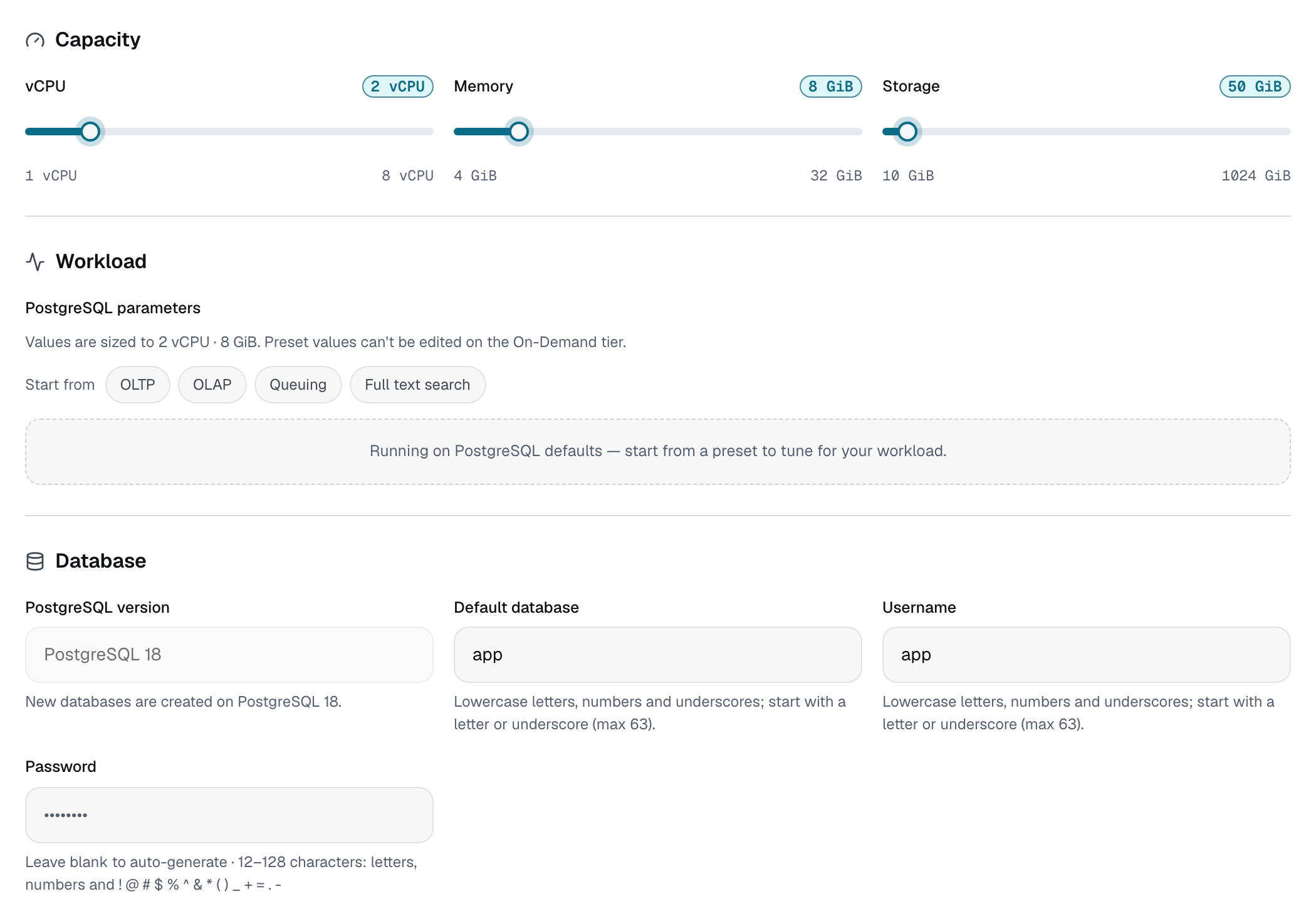
The requirements step has four sections:
- Capacity: vCPU (1 to 8), memory (4 GiB per vCPU, set together with vCPU) and storage (10 to 1024 GiB).
- Workload: an optional workload preset.
- Database: the database name, username and password. New databases are created on PostgreSQL 18.
- Placement: the location. Any, the default, lets Nistro AI pick the lowest-priced location; you can also choose US, EU or Asia. Nistro AI chooses the host, and a deployment created with Any shows its location as Nistro Managed.
Scale#
The requirements step has these sections:
- Placement: location, then cloud and region, then instance type. Leave the instance type on Any to use the cheapest instance available in that region.
- Storage: 10 to 4096 GiB per node.
- High availability: the number of standby replicas, from 0 to 8. Each standby runs on its own node. With 0 standbys the database has no failover target, and the console warns you.
- Database: the PostgreSQL version (14 to 18), database name, username and password. The version can't be changed in the console after the deployment is created.
- Support: the optional DBA support add-on.
- Advanced (optional): superuser access, a workload preset, parameters and extensions.
Database name, user and password#
- The database name and username are required and default to
app. They can use lowercase letters, numbers and underscores, must start with a letter or underscore, and can be up to 63 characters. - The password is optional. Leave it blank and a 24-character password is generated for you. If you set one, it must be 12 to 128 characters of letters, numbers and
! @ # $ % ^ & * ( ) _ + = . -.
Connect#
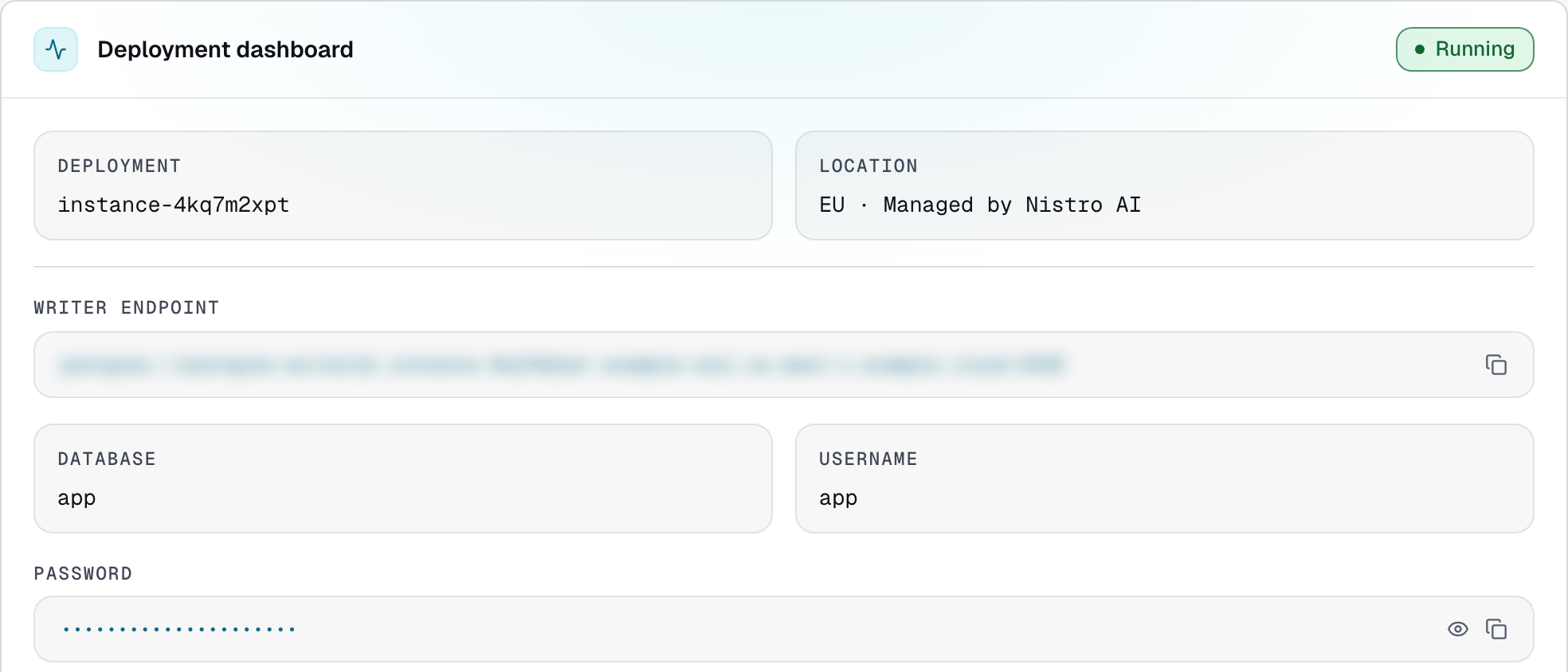
When the status is Running, the deployment's Overview shows:
- Writer endpoint: the host for reads and writes, as
postgres://<host>:5432. - Reader endpoint (Scale): a host for read-only queries, spread across the standbys. With 0 standbys it routes to the primary.
- Database, Username and Password. The password is masked; reveal or copy it at any time.
The Quick test card has a psql command with every value filled in. Copy it, or build the connection string yourself:
psql 'postgresql://<username>:<password>@<host>:5432/<database>'Applications take the same connection string, for example as an environment variable:
export DATABASE_URL='postgresql://<username>:<password>@<host>:5432/<database>'Workload presets#
A workload preset tunes PostgreSQL for a kind of workload. Its values are sized to the deployment's vCPU and memory.
| Preset | For |
|---|---|
| OLTP | Short transactional queries and many small writes. |
| OLAP | Large scans, sorts and aggregations. |
| Queuing | Job and message queues with constant inserts and deletes. |
| Full text search | Text search over GIN indexes. |
Every preset sets shared_buffers to 25% of memory and effective_cache_size to 75%, sizes work_mem and maintenance_work_mem to memory, and sets max_connections, checkpoint_completion_target and random_page_cost. Each preset then adjusts the settings that matter for its workload:
- OLTP turns off JIT compilation and makes autovacuum run more often.
- OLAP allows fewer connections, more
work_memper query, larger planner statistics and parallel workers. - Queuing turns off JIT compilation, makes autovacuum run much more often, and closes sessions left idle in a transaction for 60 seconds.
- Full text search raises
work_mem,maintenance_work_memand planner statistics, and setsgin_pending_list_limit.
On On-Demand, the preset's values are locked. You can switch to another preset after creating the deployment, but you can't go back to no preset. Resizing recalculates the preset's values.
On Scale, the preset is a starting point: its values are sized to the instance when the deployment is created, and any parameter you add overrides the preset's value.
Parameters#
Scale deployments can set these postgresql.conf parameters, at create time under Advanced or later under Config > Advanced configuration:
work_mem, maintenance_work_mem, gin_pending_list_limit, shared_buffers, effective_cache_size, hash_mem_multiplier, effective_io_concurrency, random_page_cost, default_statistics_target, jit, join_collapse_limit, max_parallel_workers, max_parallel_workers_per_gather, max_parallel_maintenance_workers, max_connections, statement_timeout, lock_timeout, idle_in_transaction_session_timeout, idle_session_timeout, deadlock_timeout, autovacuum_vacuum_scale_factor, autovacuum_analyze_scale_factor, autovacuum_vacuum_cost_limit, autovacuum_vacuum_cost_delay, autovacuum_naptime, autovacuum_max_workers, autovacuum_work_mem, vacuum_cost_limit, vacuum_cost_delay, max_wal_size, min_wal_size, checkpoint_completion_target, checkpoint_timeout, wal_compression, synchronous_commit, log_min_duration_statement, log_statement, log_min_messages, log_lock_waits, log_temp_files, log_autovacuum_min_duration, log_connections, log_disconnections, track_io_timing, track_activity_query_size, pg_stat_statements.max, pg_stat_statements.track, timezone, default_transaction_isolation, temp_file_limit.
Other parameters are rejected. Changing shared_buffers, max_connections, autovacuum_max_workers, track_activity_query_size or pg_stat_statements.max triggers a rolling restart; the console marks these with restart.
Superuser access#
Scale and Enterprise deployments can turn on the PostgreSQL superuser (postgres): select Enable superuser under Advanced when you create the deployment, or turn it on or off later from Config > Advanced configuration. On-Demand deployments don't offer superuser access.
Extensions#
Scale deployments can enable these extensions when they are created:
vector, pgcrypto, hstore, citext, uuid-ossp, pg_trgm, ltree, tablefunc, unaccent, btree_gin, btree_gist, fuzzystrmatch, intarray, earthdistance, cube, pg_stat_statements, isn, seg, tcn, moddatetime, pgrowlocks, bloom, tsm_system_rows, tsm_system_time, dict_int, dict_xsyn, autoinc, insert_username, intagg, refint.
Pick them under Advanced in the create flow. You can't change the selection after the deployment is created. In psql, \dx lists the extensions installed in your database.
High availability#
Scale deployments run a primary and 0 to 8 standby replicas, each on its own node. The reader endpoint spreads read-only queries across the standbys (or uses the primary when there are none), and if the primary fails, a standby is promoted automatically.
- Change the number of standbys from Config > High availability.
- Switch over manually from Health > Nodes: select Switch over on a standby and type
switchto confirm. Writes pause briefly and connections may need to reconnect.
Backups and snapshots#
Scale deployments are backed up daily, and each backup is kept for 3 days. Automated backups can't be deleted.
- Take a snapshot from the deployment's Backups tab while it's running.
- Restore a completed backup or snapshot from the same tab. Restoring creates a new deployment with the source's configuration and leaves the source unchanged. Type
restoreto confirm.
Snapshots & Backups in the console lists the backups and snapshots of every deployment in the team. They stay listed after their source deployment is deleted.
Resize#
- On-Demand: from Config > Compute and storage, change vCPU between 1 and 8 (memory follows) or increase storage, up to 1 TiB.
- Scale: increase storage from Config > Storage while the deployment is running. Compute is set by the instance type and can't be changed.
Storage can grow but never shrink.
Stop, start and delete#
- Stop and Start are in the deployment's header.
- Delete is in the header and on the Danger tab. Type
deleteto confirm. Deleting can't be undone.
DBA support add-on#
Scale deployments can add Standard PostgreSQL DBA support from Command Prompt, a Nistro AI partner. Select it in the Support section when you create the deployment.
- It covers help with tuning, schema design, migrations and query troubleshooting during business hours.
- It's billed separately at hourly rates under section 14 of the Terms of Use.
- After the deployment is created, the console sends the request to our team. If sending fails, the console tells you; email [email protected] to set it up.