Nistro AI Inference
Deploy open-weight models from Hugging Face behind an OpenAI-compatible endpoint.
Nistro AI Inference deploys open-weight models from Hugging Face on GPUs. Each deployment gets an OpenAI-compatible endpoint and its own API key, so existing OpenAI clients work with a changed base URL and key.
Plans#
| On-Demand | Scale | |
|---|---|---|
| Hardware | A single GPU, or a share of one for smaller models | Dedicated GPU machines, including multi-GPU instances |
| Placement | A location: Any, US, EU or Asia | A location, then the cloud, region and instance type |
| Replicas | Scales to zero when idle and runs one replica while serving | 1 to 8 replicas, fixed; no autoscaling |
| Access | Self-serve | On request |
Enterprise deploys into your own cloud account and is set up with our team. To ask for it, select the Enterprise plan in the create flow and then Contact us.
Choose a model#
Enter a Hugging Face model id, such as google/gemma-4-26B-A4B, or paste its huggingface.co URL. The console looks the model up as you type and shows its architecture, data type and maximum context length. If it can't find the model, check the spelling and that the model is public on Hugging Face.
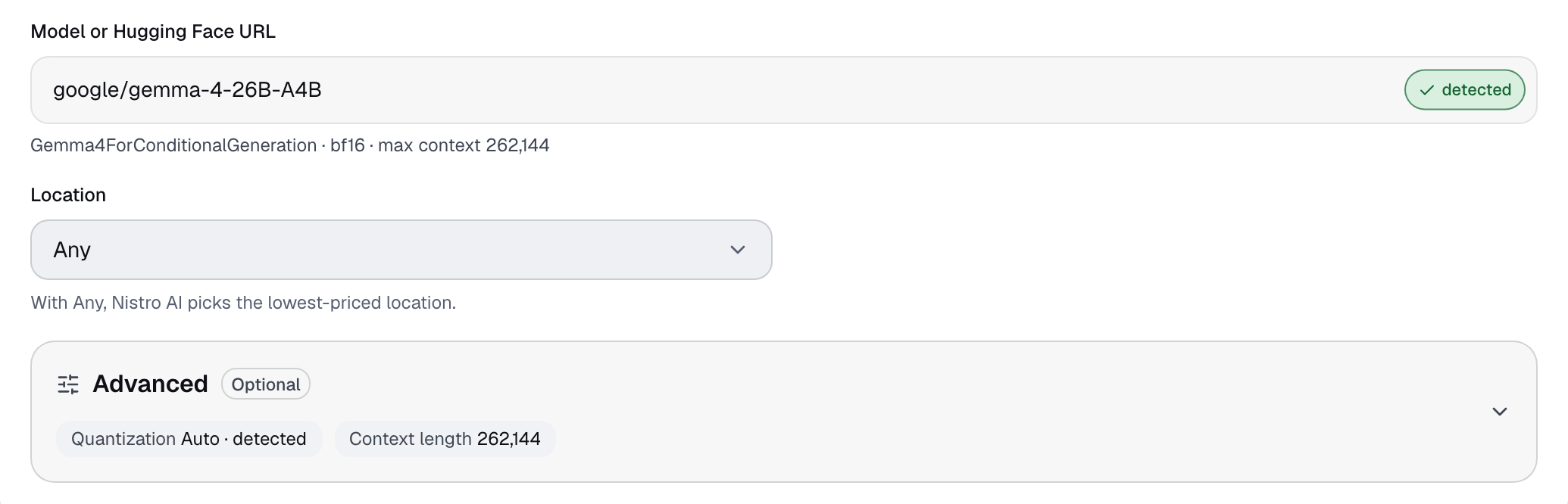
Models with Safetensors or PyTorch weights are preferred. A repository that only has GGUF weights is served from those. The Hardware step shows which format the deployment uses.
Under Advanced you can also set:
- Quantization: Auto uses what the repository provides. Once the model is found, the list shows the variants available in the repository.
- Context length: defaults to the model's maximum context once the model is found, unless you've changed it. It can't exceed the model's maximum.
- GPU type (Scale only): Any lets Nistro AI pick the best price, or choose H100-80GB, H200-141GB, A100-80GB, L40S or L4. On-Demand always picks the lowest-priced GPU that fits the model.
Create a deployment#
- Open Inference Deployments and select Create.
- Pick a plan, enter the model and choose a Location. On On-Demand, Any, the default, lets Nistro AI pick the lowest-priced location. Scale needs a specific location and a number of Replicas; each replica runs on its own GPU node.
- Select Recommend hardware. The Hardware step shows the required VRAM, the topology, the model format and sizing details such as the KV cache and the minimum GPU count.
- On Scale, choose the cloud, region and instance type. The list only has machines that can run the model at your context length.
- Select View pricing. The Pricing step shows the selected hardware and a capacity review: required and actual VRAM, tensor parallelism and GPU memory utilization.
- Select Deploy. The deployment's page opens and shows its progress.
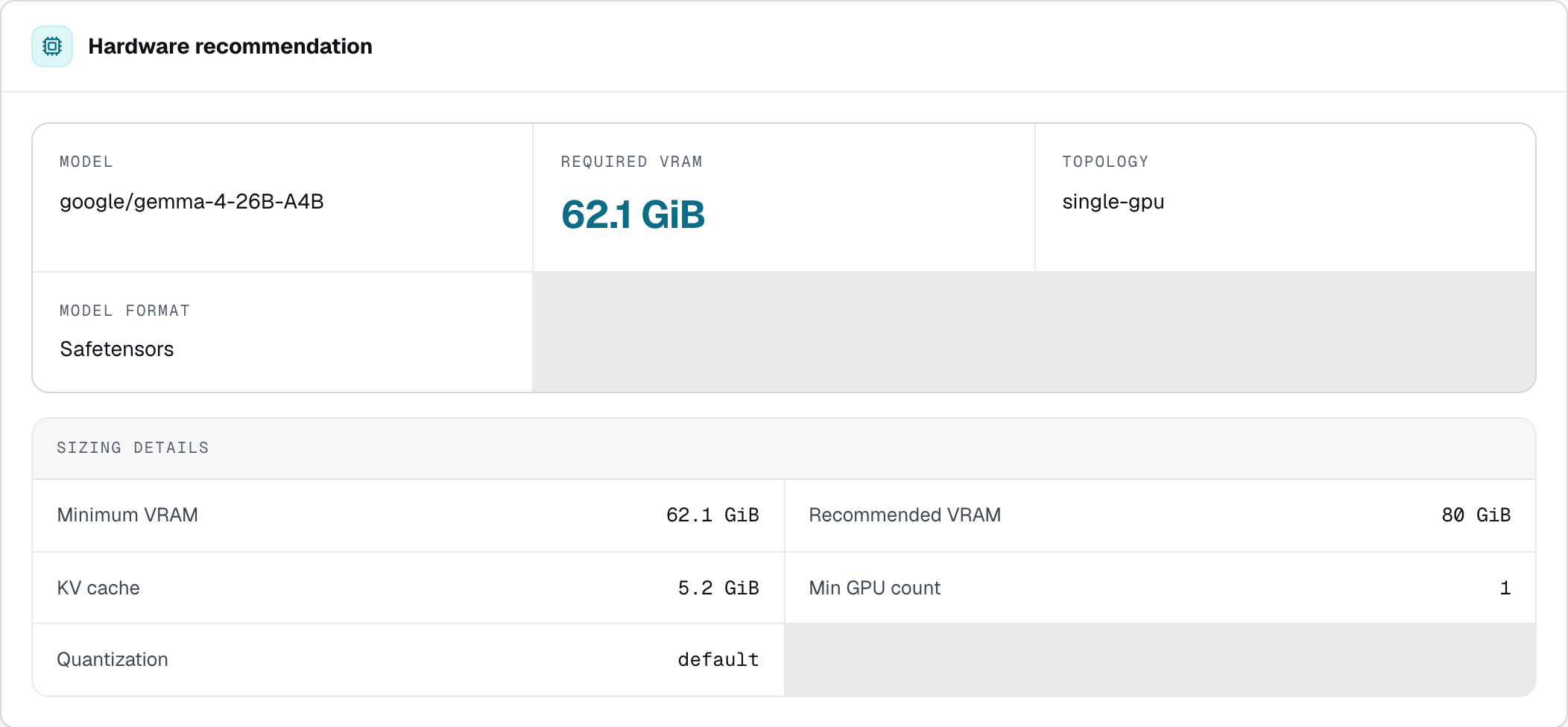
If no hardware can run the model, the console says so. Try another location, a shorter context length or a quantization.
Request Scale access#
Inference Scale is available on request. In your own team, select the Scale plan, optionally describe your use case, and select Contact us. The plan then shows REQUESTED. Once the request is approved, the Scale plan becomes selectable and you can deploy on it.
Call the API#
A ready deployment shows its OpenAI-compatible endpoint on the Overview tab. The Call the API tab shows its API key, labelled API key (NISTRO_TOKEN), and example requests.
- Send the key as a Bearer token in the
Authorizationheader. - The API's base URL is the endpoint followed by
/openai/v1. - The model name in requests comes from the repository name: lowercased, with any character other than a letter, digit or dot turned into
-, and at most 40 characters. For example,google/gemma-4-26B-A4Bbecomesgemma-4-26b-a4b. The console's examples already include it.
Store the key in an environment variable:
export NISTRO_TOKEN='<api-key>'Chat completions#
curl <endpoint>/openai/v1/chat/completions \
  -H "Authorization: Bearer $NISTRO_TOKEN" \
  -H "Content-Type: application/json" \
-d '{"model":"<model>","messages":[{"role":"user","content":"Hello"}]}'Streaming#
curl <endpoint>/openai/v1/chat/completions \
  -H "Authorization: Bearer $NISTRO_TOKEN" \
  -H "Content-Type: application/json" \
  -d '{"model":"<model>","messages":[{"role":"user","content":"Hello"}],"stream":true}'
Other endpoints#
List the deployment's models:
curl <endpoint>/openai/v1/models \
  -H "Authorization: Bearer $NISTRO_TOKEN"
Text completions:
curl <endpoint>/openai/v1/completions \
  -H "Authorization: Bearer $NISTRO_TOKEN" \
  -H "Content-Type: application/json" \
  -d '{"model":"<model>","prompt":"Hello","max_tokens":64}'
Scale to zero#
On-Demand deployments scale to zero when they're idle. The Live status card then shows Idle: "Scaled to zero — the first request cold-starts the model." The next request starts a GPU replica and loads the model, and the status shows Scaling up until the replica is serving. Expect that first request to take longer than the ones after it.
Scale deployments keep their replicas running and never scale to zero.
Monitor#
The Overview tab refreshes while the deployment runs:
- Live status shows the ready and total replicas, the replica range and when the deployment was last active.
- For models served from Safetensors or PyTorch weights it also shows in-flight and waiting requests, tokens per second, p50 and p95 latency and KV cache usage, with charts of throughput, in-flight requests, end-to-end p95 latency and KV cache utilization.
- For GGUF models it shows the GPU memory the loaded model uses.
Replicas#
On Scale, change the number of replicas from the Replicas card on the Overview tab, between 1 and 8. The count is fixed; there's no autoscaling. The deployment shows updating while the change applies.
Delete#
Select the trash icon in the deployment's header, or Delete deployment on the Danger tab, and type delete to confirm. Deleting can't be undone.
Limits#
- On-Demand runs on a single GPU. Models that need more than one GPU require Scale.
- The context length can't exceed the model's maximum.
- See Limits for the limits on how many Inference deployments you can run.